From Prompt to Verified UI: An MCP Workflow Case Study
We build a visual regression testing tool, so we test our own interface with it. This is a walk through one real change to our pricing page, where a reasonable-looking prompt to an AI assistant quietly shifted a layout, and the MCP visual testing loop caught it in the same session before the code ever reached review. It is the workflow we use day to day, told through a single concrete regression rather than in the abstract.
Key takeaways
- The workflow closes the loop inside the editor: the assistant makes a change, then calls our MCP server to screenshot, diff, and verify it before you review the code.
- A prompt to restyle our pricing toggle passed every functional test while pushing the "most popular" badge out of alignment on one plan card.
- Perceptual diffing flagged the shift on the pricing page while staying quiet about the unrelated anti-aliasing noise on the rest of the route.
- Resolving it was two assistant tool calls: approve the intended toggle restyle, fix the unintended badge shift, then re-run to green.
- The value is timing, not just detection: catching a visual regression seconds after it is introduced is far cheaper than catching it in a failed CI run or in production.
The setup: tidying our own pricing page
We were tidying the pricing page. The Pixel House has three plan cards, Solo, Team, and Agency, with a monthly and annual toggle above them and a "most popular" badge on the Team card. The task was cosmetic: restyle the toggle to match a refresh of the rest of the marketing site, nothing that should touch the cards themselves.
This is exactly the kind of change that is tempting to hand to an AI assistant and merge on a glance. It is visual, it is low-risk on paper, and the diff in the pull request looks small. It is also exactly the kind of change that breaks something two components away without any test going red, which is why it makes a good case study. The point is not that the assistant did something careless; it is that a plausible, well-scoped prompt produced a regression that only a visual check would catch.
What did we ask the assistant to do?
We gave our assistant in Cursor a single, ordinary instruction: restyle the monthly and annual pricing toggle to use the new pill-style buttons from the site refresh, and keep the existing behaviour. No mention of the plan cards, because the cards were not supposed to change.
The assistant edited the toggle component, adjusted the shared button styles, and reported success. Every functional check agreed with it. The unit tests for the toggle still passed, because the toggle still toggled. The end-to-end test that asserts the Team plan shows the right price still passed, because the price text was untouched. On behaviour, nothing was wrong. The regression was entirely in how the page now looked, which is the blind spot that unit and functional tests are designed not to cover.
How does the MCP loop verify the change?
The verification is a short sequence of tool calls the assistant makes through the Model Context Protocol, the open standard that lets an assistant call external tools, with no context switch out of the editor. Our server exposes the eight tools that make this loop work: take-screenshot, create-baseline, compare-screenshots, run-visual-regression, discover-pages, get-diff-report, approve-changes, and list-baselines. For this change the assistant only needed three of them.
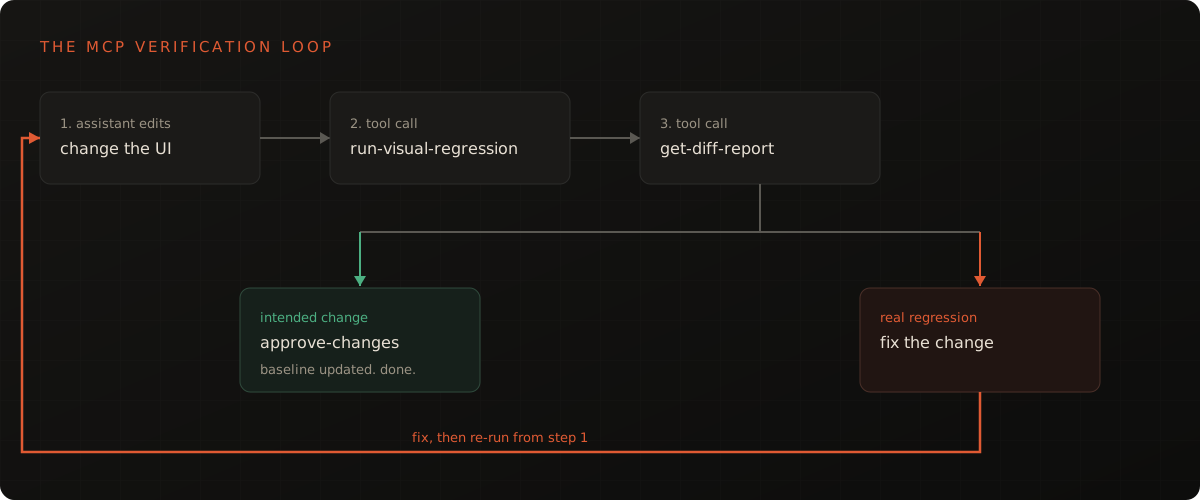
After making the edit, the assistant called run-visual-regression on the pricing route. The server captured the page across our configured viewports, a desktop width and a mobile width, and compared each capture against the approved baseline using perceptual structural comparison rather than a naive pixel count. That comparison choice matters here: the rest of the page rendered with the usual sub-pixel anti-aliasing differences, and a raw pixel diff would have lit up the whole route. The structural comparison stayed quiet about that noise and surfaced only the region that actually moved, a distinction we cover in SSIM vs pixel diff.
The assistant then called get-diff-report to read the result in detail. The report came back failed, with the difference concentrated in a single region near the top of the Team card. The new pill-style toggle was a few pixels taller than the old control, the card grid reflowed to absorb the extra height, and the "most popular" badge that sits absolutely positioned against the card was now overlapping the plan name instead of sitting above it. One styling change, two components away from the badge, and the badge broke.
What did the diff actually catch?
The diff caught a real, shipping-quality regression that no behavioural test could see. Below is the comparison the report surfaced: the approved baseline, the page after the prompt, and the perceptual diff overlay that isolates the changed region.
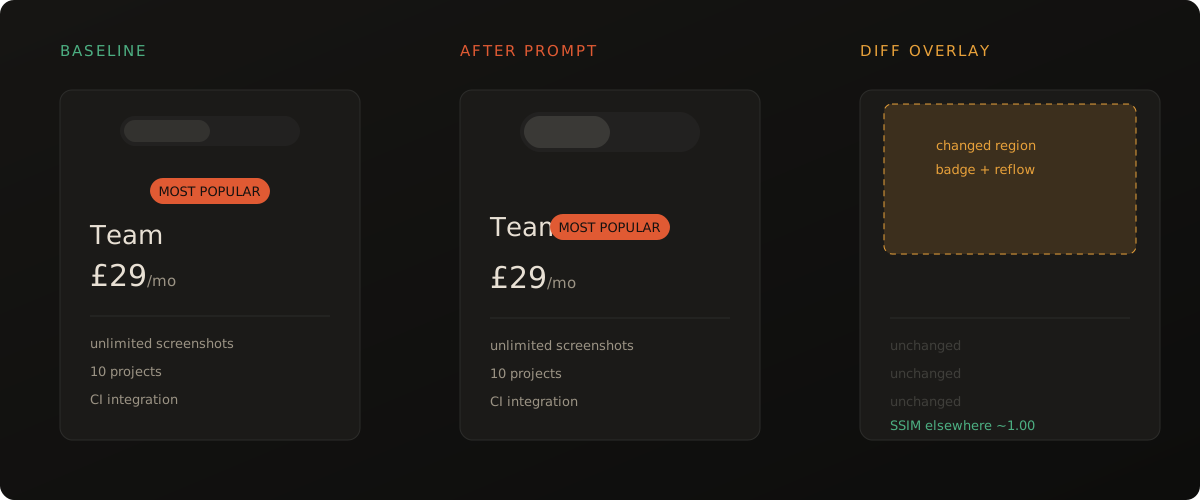
The structural similarity score for the pricing route dropped well below our pass threshold, while the score for every other captured page stayed effectively at one. That is the signal we want from a visual check: loud about the one place that changed, silent everywhere else. A failure that points straight at the Team card is a failure a developer trusts and acts on, rather than a wall of red that gets muted after the third false alarm.
It is worth being precise about what made this catchable. The regression was not in the toggle the assistant edited; it was in a sibling component that reflowed because of the edit. No diff of the source code would have flagged the badge, because the badge's code never changed. Only a comparison of the rendered output, across the viewports the layout actually reflows at, could surface it.
How was it resolved?
Resolution stayed inside the same session and came down to separating the intended change from the unintended one. The toggle restyle was wanted, so the assistant called approve-changes for the toggle region once we confirmed the new pill buttons looked right, promoting that part of the page to the new baseline. The badge overlap was not wanted, so the assistant adjusted the card's top padding to restore the space the badge needs, then called run-visual-regression again.
The two changes the run surfaced were handled differently, which is the whole point of separating intended from unintended:
| Change | Intended? | Action taken |
|---|---|---|
| Pill-style toggle restyle | Yes | approve-changes to promote it to the new baseline |
| Badge overlapping the plan name | No | Restored the card's top padding, then re-ran |
The second run came back green on the pricing route, with the toggle now matching the approved look and the badge back above the plan name. The whole loop, from the first failed report to the green re-run, happened in the editor without opening a browser, pushing a branch, or waiting on a pipeline. The change that reached review was the change we actually intended, and the pull request description could note that the visual baseline had been updated deliberately.
What we took away from using it on our own work
The lesson we keep relearning by using the tool on our own work is that the value is in the timing as much as the detection. CI would have caught this too; our pipeline runs the same comparison and gates merges on it. But catching it in CI means a failed pipeline, a context switch back to the change a few minutes later, and a second commit. Catching it at authoring time means the assistant that made the change also fixes it, with the reasoning still in context, before anyone else sees it.
The second takeaway is about trust. We left the visual check running on every change rather than muting it because perceptual comparison keeps the false-positive rate low enough to live with, a property we lean on heavily and have written about in how to eliminate false positives in visual testing. A check that cried wolf on every anti-aliasing difference would have been switched off long ago, and then this badge regression would have shipped. The honest framing is that this is not a dramatic outage avoided; it is a small, ugly bug caught cheaply, which is exactly the unglamorous work visual testing is for.
How can you run the same workflow?
You can reproduce this loop on your own project with any MCP-capable assistant, such as Claude Code, Cursor, or Windsurf. The mechanics, connecting the server, capturing a first baseline, and running the check, are covered step by step in visual regression testing in Claude Code, and the wider picture of why this belongs in the AI development loop is in the MCP visual testing guide.
If you want to feel the comparison first without any setup, the free diff tool and free screenshot tool run the same perceptual comparison in the browser with no account. When you are ready to put it in your editor, the getting started guide covers the MCP setup in about a minute.
Further reading in this series
This case study is part of our work on visual testing with AI coding assistants:
- Visual Testing for AI Coding Assistants: The MCP Guide: the hub, covering what MCP visual testing is and why it matters.
- Visual Regression Testing in Claude Code: the step-by-step setup behind the workflow in this case study.
- How Visual Diffing Works: Pixel, SSIM and Perceptual Comparison: the comparison methods that keep the diffs in this story clean.
- SSIM vs Pixel Diff: Which Catches Real Regressions?: why the structural comparison stayed quiet about noise and loud about the badge.
Frequently asked questions
What is an MCP visual testing workflow?
An MCP visual testing workflow is the loop where an AI coding assistant makes a UI change, then calls a visual testing server through the Model Context Protocol to screenshot the result, diff it against an approved baseline, and report any visual regression. The assistant verifies its own work before you review the code, so layout breakage surfaces in the same session.
How does an AI assistant verify a UI change with MCP?
After editing the code, the assistant calls MCP tools such as run-visual-regression and get-diff-report. The server captures the page across the configured viewports, compares each screenshot to the baseline using perceptual diffing, and returns a structured verdict. The assistant reads that verdict and either flags the regression or, for an intended change, calls approve-changes to update the baseline.
Can visual regression testing catch bugs that unit tests miss?
Yes. Unit and functional tests assert behaviour and the contents of the DOM, not how the page looks. A change can leave every assertion green while shifting a badge, breaking alignment, or collapsing spacing. Visual regression testing compares the rendered pixels, so it catches the layout and styling regressions that behavioural tests are blind to by design.
Why run visual testing through MCP instead of only in CI?
Running it through MCP moves the check into the editing session, so the assistant catches a regression seconds after introducing it, with full context of the change. CI is still worth keeping as the backstop that gates merges, but catching the break at authoring time is faster to fix and avoids a round trip through a failed pipeline.
What does approve-changes do in a visual testing MCP server?
approve-changes promotes the current screenshot to be the new baseline for that page and viewport. When a visual difference is intentional, such as a deliberate redesign, you approve it so future runs compare against the updated look. It is the mechanism that separates a real regression, which you fix, from an intended change, which you accept.